
WiiMC
More actions
| WiiMC | |
|---|---|
 | |
| General | |
| Author | Tantric, rodries |
| Type | Media Players |
| Version | 1.3.4 |
| License | GPL |
| Last Updated | 2013/11/23 |
| Links | |
| Download | |
| Website | |
| Source | |
WiiMC (Wii Media Centre) is an open source media player for the Nintendo Wii. It allows users to play various types of media files such as videos, music and photos on their Wii console.
Features
- Ability to play virtually any video or audio format.
- DVD playback, with DVD menu support (newer Wiis have incompatible drives).
- Picture viewer.
- Music player.
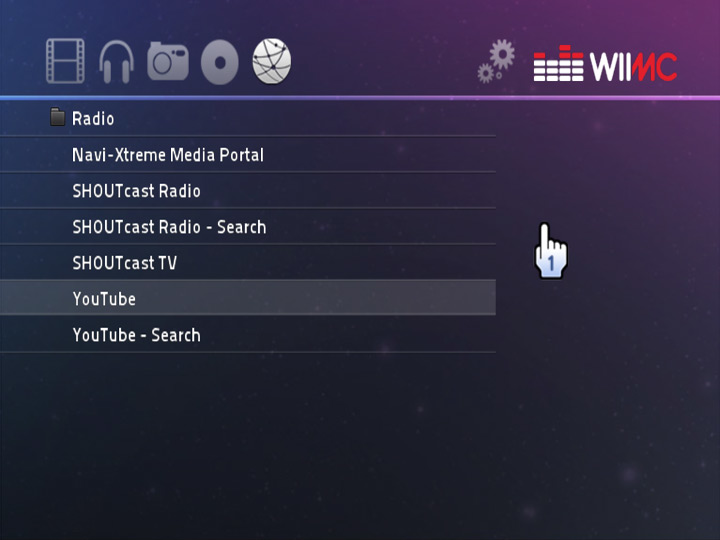
- Online media support, including SHOUTcast, YouTube, and Navi-X.
- SD, USB 2.0, SMB, HTTP, and FTP support.
- Attractive libwiigui-based interface, designed with the Wii in mind.
Installation
Prerequisites:
- The system must have IOS58 to use this channel. Either upgrade to System Menu 4.3, or use the IOS58 Installer.
- Homebrew Channel 1.0.8+ running on IOS58 to run the installer. If HBC is not using IOS58, you will need to reinstall HBC after installing IOS58.
- This channel tries load apps/wiimc/boot.dol from SD or USB. WiiMC has to be installed in one of these locations.
How to install:
- Extract the files in the WiiMC Channel Installer package to the apps folder on your SD/USB device.
- A new WiiMC Channel Installer entry will appear in the Homebrew Channel and you can launch the channel installer from there.
- After installing, you may delete the channel installer from the apps folder.
WiiMC is capable of loading files from many different sources, including SD, USB, DVD, SMB, and FTP. Although all of these are supported, USB and SMB are the recommended methods for a variety of reasons. The setup guide and documentation can be found here.
User guide
Supported file formats
| Video | 3gp, asf, avi, bik, divx, dpg, dv, |
|---|---|
| Audio | aac, ac3, aif, aiff, amr, ape, apl, asf, au, flac, m4a, m4b, m4p, mka, mp2, mp3, mpc, ogg, ra, ram, raw, rm, shn, tta, wav, wma, wv |
| Pictures | bmp, jpeg, jpg, png, gif |
| Playlist | asx, m3u, pls, plx, ram, smil |
(Video maximum allowed resolution: 1280x720.)
DVD Playback:
- Files with AVC/H.264 video streams (typically .mp4, .mkv or .flv's from YouTube or other sites) with resolutions up to 720x480p usually play correctly.
- Files with MPEG-4 Simple video streams (typically XVID/DIVX .avi's) with resolutions up to 656x352 play correctly.
- Files with MPEG-2 PS video streams (typically DVD rips and TV-DVR recorded .mpg's) with resolutions up to 720x480 play correctly.
- Files with MPEG-2 TS video streams (typically HDTV recorded .ts files) with resolutions up to 1280x720 play correctly.
- AAC, AC3, FLAC, MP3, OGG Vorbis, WavPack, and WAV PCM Audio Streams all play correctly.
Limitations
- CD playback: the Wii drive is DVD only.
- HD output: even on component cable Wii hardware is limited to 480p or 576i.
- 5.1 sound: Wii hardware has only two analogue audio output channels (2.0).
- 720p/1080p playback or downscale: power is not enough to even decode, not to mention downscaling.
- Deinterlace: CPU is not powerful enough, and MPlayer filters are not optimized.
- SMB and FTP passwords are limited to 14 characters.
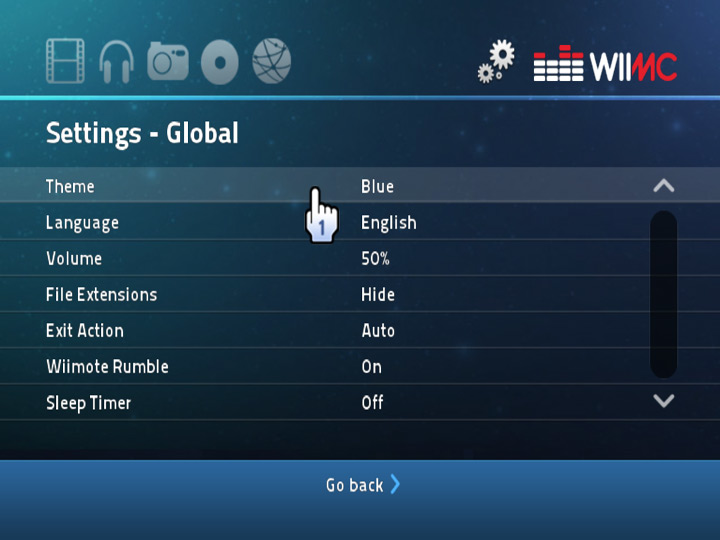
Settings
| GLOBAL | |
|---|---|
| Theme | The GUI color scheme. Available colors are: blue, green, grey, orange, and red. |
| Language | The language used in the GUI. This does not affect subtitles. Depending on the language, a different font may be required. WiiMC will prompt you to download the font from the WiiMC site. This setting affects how filenames are displayed – if your directory contains files using non-Latin characters, you will need to change this setting accordingly in order for them to display properly. |
| Volume | The volume used when playing files. |
| File Extensions | Whether or not file extensions will be displayed in the file browser. |
| Exit Action | What happens when you exit WiiMC. Leaving this at Auto will either return you to the Homebrew Channel, or to the Wii Menu, depending on how you launched WiiMC. |
| Wiimote Rumble | Enables/disables Wiimote rumbling in the GUI. |
| Sleep Timer | When enabled, shuts down the Wii after the specified time has elapsed. |
| Screensaver Delay | How much idle time must elapse before the screensaver is displayed. |
| Inactivity Shutdown | How much idle time must elapse before the Wii shuts down. |
| Browser Folders | The behavior of the file browser when you first enter an area. If set to Use Last Browsed, WiiMC will remember the last folder you were in and the browser will start in that folder the next time you enter the area. If set to Static, the browser will always start in the fixed path specified for that area. |
| Starting Area | The area WiiMC starts in when first launched (Videos, Music, Pictures, DVD, or Online Media) |
| VIDEOS | |
| Screen Zoom | The horizontal and vertical scaling (in %) WiiMC uses when playing a video. 100% means no scaling is performed. Use this to help adjust WiiMC for your TV set. |
| Screen Position | The horizontal and vertical shift WiiMC performs when playing a video. Use this to help adjust WiiMC for your TV set. |
| Frame Dropping | When set to Auto, skips displaying some frames to maintain audio/video sync on CPU-intensive videos. When set to Always, WiiMC will perform more intense frame dropping (may break decoding and lead to image distortion). Unless you are having problems with audio/video sync, leaving this setting at the default of Disabled is recommended. |
| Aspect Ratio | Changes the aspect ratio WiiMC displays videos at (2.35:1, 1.85:1, 16:9, or 4:3). Leaving this setting at the default of Auto is recommended. |
| Cache Fill | How much (in %) of the 8MB cache WiiMC will fill before beginning playback. Even when WiiMC is still caching, you can begin playback immediately by unpausing the video. |
| Audio Language | The default language to select for videos with multiple audio streams. |
| Audio Delay | Audio delay (in seconds). Can be negative. |
| Auto-Resume | When starting a video begins playback at the last known position. Video positions are saved to a file when WiiMC exits. |
| Auto-Play Next Video | When enabled, after a video completes, the next video in the browser will begin playing automatically. |
| Skip Backward | The time (in seconds) to skip backward in a video when the Skip Backward button is used. |
| Skip Forward | The time (in seconds) to skip forward in a video when the Skip Forward button is used. |
| Videos Files Folder | The folder the browser will display when entering the Videos area. If the Browser Folders setting is set to Use Last Browsed, this value will change automatically as you use the browser. |
| MUSIC | |
| Play Order | The order files in your Music playlist will play. If set to Single, WiiMC will play one file and stop. If set to Continuous, WiiMC will play all files in the playlist sequentially. If set to Shuffle, WiiMC will play all files in a random order. If set to Loop, WiiMC will continuously play one file. |
| Music Files Folder | The folder the browser will display when entering the Music area. If the Browser Folders setting is set to Use Last Browsed, this value will change automatically as you use the browser. |
| PICTURES | |
| Pictures Files Folder | The folder the browser will display when entering the Pictures area. If the Browser Folders setting is set to Use Last Browsed, this value will change automatically as you use the browser. |
| Slideshow Delay | The time (in seconds) before the next picture is displayed is displayed when in slideshow mode. |
| DVD | |
| DVD Menu | When set to Show, WiiMC will display the DVD menu when loaded from the DVD icon. When set to Skip to Main Title, WiiMC will automatically begin playing the longest title on the DVD. Note that WiiMC will not display all DVD menus correctly. Try changing this setting if you have problems. |
| DVD Support | Enables/disables DVD support in WiiMC. Use this if you have a newer Wii (where DVD support was removed), or if you don’t intend to use DVD functionality in WiiMC. |
| ONLINE MEDIA | |
| Cache Fill | The percentage of cache to fill before beginning playback of online media. |
| YouTube Quality | The YouTube format to use when viewing YouTube files. Settings are: Low (400×240), Medium (480×360), and High (640×360). Adjust this to a lower setting if you encounter problems with excessive buffering. |
| Online Media Folder | The folder (or address) the browser will display when entering the Online Media area. If the Browser Folders setting is set to Use Last Browsed, this value will change automatically as you use the browser. |
| NETWORK | |
| Settings | Add and edit SMB shares and FTP sites, accessible from the root listing of the file browser. |
| SUBTITLES | |
| Visibility | Enable/disable subtitles. If you don’t plan to use subtitles, it is suggested to set this to Off. |
| Delay | Delays subtitles by the specific time (in seconds). Can be negative. |
| Language | The default language to select for videos with multiple subtitle tracks. |
| Codepage | The codepage for the language used in subtitles. This setting impacts the display of non-Latin symbols in subtitles and must be configured properly. |
| Color | The color to use when displaying subtitles. Note that the color of embedded subtitles cannot be changed. |
| Size | Changes the size of subtitles in videos. You may have to adjust this setting depending on the resolution of your videos. |
Controls
File Browser:
Aim - Pointer/Change Selection
D-Pad Up/Down - Selection Up/Down
D-Pad Left/Right - Page Up/Down
A - Select Item
B - Up One Level
Home - Exit WiiMC
1/2 - Next/Previous Media Type
Videos Playback:
Aim Show Onscreen Display
D-Pad Up - Switch Subtitles
D-Pad Left/Right - Step Back/Forward 30s
D-Pad Down - Switch Audio Stream
A - Pause/Resume
Home - Stop Playback/Buffering, Open Menu
Minus/Plus - Decrease/Increase Volume
1 - Toggle Onscreen Display
Music Playback:
Plus - Add Item To Playlist (Music)
Picture Viewer:
Aim - Show Onscreen Display, Select where to Zoom in/out
D-Pad Left/Right - Previous/Next Picture
Minus/Plus - Zoom Out/In
A - Move Picture (when zoomed in)
Home - Exit WiiMC
Screenshots
Media
How To Install WiiMC! (DVD/Video/Music/Pictures) [Wii 4.3] (Tech James)
Changelog
1.3.4 2013/11/23
- SMB support for Synology DSM 4.3.
1.3.3 2013/03/31
- Fixed YouTube (thanks jhb50).
1.3.2 2013/01/01
- Fixed YouTube (thanks jhb50).
1.3.1 2012/09/18
- Fixed YouTube (thanks jhb50).
1.3.0 2012/07/01
- Recompiled with SMB changes reverted to fix incompatibilities.
1.2.9 2012/06/16
- Fixed incompatibility with NAS devices.
1.2.8 2012/06/10
- Synced to MPlayer r34991 and ffmpeg 44c10168cff4.
- Greatly improved SMB file browsing speed.
1.2.7 2012/05/24
- Fixed crash caused when leaving the Music area.
- Synced to MPlayer r34946 and ffmpeg 307562be98b4.
1.2.6 2012/04/20
- Fixed USB support.
1.2.5 2012/04/19
- Fixed stability issues.
- Fixed YouTube (thanks jhb50).
- Synced to MPlayer r34869 and ffmpeg 74e4bb691254.
1.2.4 2012/03/17
- Synced to MPlayer r34805 and ffmpeg 8fbf825ecc32.
- Fixed a bug with 4KB sector drives.
- Added padding below subtitles.
- Fixed display of non-latin characters in 1.2.3.
- Fixed freezing issue in 1.2.3.
- Fixed online media issues in 1.2.3.
1.2.3 2012/03/03
- Synced to MPlayer r34780 and ffmpeg 83c418e68ee5.
- Compiled with latest libogc and devkitPPC r25.
- Improved network initialization.
- Improved music playlist sorting - now it is per-folder (patch by entropy).
- Added playlist reset with minus key (patch by entropy).
- Added a new "Through" setting for music playlists (patch by entropy).
1.2.2 2012/01/14
- Fixed YouTube search.
1.2.1 2012/01/14
- Synced to MPlayer r34540 and ffmpeg a9bd29e15e8d.
- Fixed HTTP bugs that made YouTube unstable.
- Added thumbnails for YouTube.
- Improved video resizing granularity (thanks eric).
- Translation updates.
- Other minor bug fixes.
1.2.0 2011/09/04
- Synced to MPlayer r34053 and libav 5938e0218543.
- Adjusted DVD drive ID detection – fixes drives that stopped working.
1.1.9 2011/08/26
- Synced to MPlayer r34002.
- New YouTube scraping code (thanks jhb50).
- Fixed problem with some subtitles not appearing.
- Added support for subtitles over FTP.
- Added chunk support in HTTP protocol.
- Added Bulgarian translation.
- Other minor bug fixes.
1.1.8 2011/05/17
- Synced to MPlayer r33269.
- Added Danish translation.
- Clicking on a browser file already loaded will now resume instead of reload.
- Faster loading of online streams.
- Fixed a bug with some MMS streams.
- Improved network initialization – now you can unplug/plug USB ethernet.
- Fixed a potential crash caused by the audio code.
- Improved memory management.
- Other minor optimizations and improvements.
1.1.7 2011/04/16
- Fixed a bug that caused a crash if Aspect Ratio was not set to Auto.
1.1.6 2011/04/14
- Synced to MPlayer r33122.
- Fixed an issue with music playlist queuing.
- Fixed an issue playing a music playlist with a picture slideshow.
- Fixed a bug that caused some MMS streams not to work.
- Fixed a bug that caused WiiMC to crash with a malformed restore_points file.
- Added a setting to write a debug log to SD - set "debug" to "1".
- Video rendering corrections and optimizations.
- Translation updates.
1.1.5 2011/03/25
- Synced to MPlayer r33036.
- Fixed Inactivity Shutdown feature.
- Fixed plain playlist support.
- Added support for encrypted DVDs for USB DVD drives (thanks clava).
- Fixed network initialization for some USB LAN adapters.
- Other minor changes.
1.1.4 2011/03/04
- Synced to MPlayer r32994.
- Fixed crash in Online Media area.
- Fixed crashes on ogg and mp4 files.
- Fixed YouTube support.
- Added Inactivity Shutdown setting.
- Added separate settings to change backward/forward skip.
- Improved memory management.
- Other minor changes.
1.1.3 2011/02/19
- Synced to MPlayer 32866.
- Fixed crash for some USB drives.
- Added option to change screensaver delay.
- Fixed incorrect warning about picture sizes being > 6MB.
- Improved network initialization routines.
- Improved subtitle scaling calculations.
- Improved shutdown - if WiiMC fails to shut down within 5 seconds, shutdown will be forced.
- Experimental USB DVD drive support (thanks clava).
- Other minor optimizations and improvements.
1.1.2 2011/01/29
- Synced to MPlayer r32815.
- Fixed broken audio/subtitle switching.
- Fixed "Exception (Alignment)" crash.
- Changed from mpg123 to ffmp3 (fixes some audio-related problems).
- Added ext 2/3/4 support.
- USB compatibility improvements.
- Improved performance (enabled 64-byte fetch mode for the L2 cache).
- Large file (> 4GB) support.
- Fixed relative playlist paths.
- Paired-singles enhancements (thanks Extrems).
- Added IOS whitelist - a warning will now appear if you are not using IOS58 or IOS61.
- Disable dvdnav over SMB (it's too slow).
- Added Tamil translation (thanks dpandian).
- Other minor optimizations and bug fixes.
1.1.1 2010/12/16
- Synced to MPlayer r32709.
- Fixed image stuttering and audio sync issues.
- Fixed pointer alignment on DVD menus.
- Added ISO/IFO DVD playback, with DVD menu support.
- Added screen resizing while watching a video via the Wiimote. Just hold down B and use the arrow keys (thanks clava).
- Performance optimizations using paired singles (thanks Extrems).
- Improved USB compatibility.
- Added support for playlist files in the Videos and Music areas.
- Enable negative subtitle delay values.
- Replace libmp3 with libmpg123. Fixes a number of MP3 audio bugs.
- Added a setting to change the starting area.
- New JPG scaler for the Picture Viewer (thanks puddles).
- Display artist and song on separate lines for SHOUTcast (thanks jhb50).
- Added settings for YouTube quality and caching for online media.
- Subtitle autoscaling.
- Added a delay on startup so those with slow USB drives are not bumped back to the main browser list.
- Shifted all GUI elements inwards to fix left/right cropping occuring on 16:9 for some people.
- Fixed a Picture Viewer crash.
- Fixed lowercase bug for NTFS.
- Many other minor fixes and improvements.
1.1.0 2010/10/08
- Synced to MPlayer r32341.
- Fixed a crash that happened if your router was turned off.
- Fixed "blank listing" issue for SMB.
- Improved memory management, resulting in improved performance.
- Improved USB compatibility and speed.
- USB bug fixes.
- NTFS bug fixes.
- Fixed audio sync regression from 1.0.9.
- Change YouTube default to 480p.
- Fixed "vanishing pointer" issue when watching CPU-intensive videos.
- Improved shuffle for music.
- Channel updated (improved USB compatibility).
- Other miscellaneous bug fixes/improvements.
1.0.9 2010/08/18
- Fixed a bug that caused NTFS drives not to show up.
1.0.8 2010/08/17
- Improved USB mounting and updated channel. Should hopefully help those who are receiving the “Could not find a valid SD or USB device” message.
- Improved network initialization.
1.0.7 2010/08/15
- IOS 202 support removed.
- USB 2.0 support via IOS 58 added - requires that IOS58 be pre-installed.
- WiiMC channel updated - requires IOS58 and does NOT require a cIOS to install (Thanks to megazig and svpe for help with this).
- DVD support via AHBPROT - requires latest HBC or latest WiiMC channel.
- Synced to MPlayer r31961.
- YouTube support (thanks to lukegb and ataraxis for some help).
- Picture zoom, rotate, pan, auto-rotate via exif data (thanks ataraxis).
- Fixed seeking for local FLV files.
- Fixed black-screen video issue with videos having widths over 1024.
- Fixed playback of MKV files.
- New YUV->RGB conversion in TEV for videos up to 720p (thanks sepp256).
- Restrict video loading to 720p (1280x720).
- Enable caching of DVD CSS keys. They are written to the 'css' folder (created automatically).
- Fixed playback of files with mono sound.
- Fixed issue with HTTP over-buffering.
- Other minor improvements/corrections.
1.0.6 2010/07/21
- Reverted USB2 changes.
- Synced to MPlayer r31761.
- Fixed display of radio stream information.
- Other minor changes.
1.0.5 2010/07/14
- Synced to MPlayer r31641.
- Added volume control in Music area.
- Added option to hide DVD functionality from the UI.
- UTF-8 SMB support.
- Ability to use both USB ports (requires IOS 202 installed with installer v1.1 – WARNING: older versions of IOS 202 are NO LONGER supported).
- Increase max SMB shares to 9.
- Fixed sleep timer.
- Added “Now Playing” to screensaver.
- Disable screensaver while slideshow is active.
- Increased video auto-play limit from 20 to 50.
- MMS support (thanks denper).
- Improved online stream display (thanks gazstone).
- New SHOUTcast support (WARNING: updating will overwrite your onlinemedia.xml to install new links – backup your old links if necessary).
- Audio language setting.
- Jump to and highlight folder when going up one level.
- Highlight file when returning to menu.
- Save settings when power button is used.
- Added option to use static folder locations.
- Display parent directory beside Up One Level.
- Improved restore points behavior.
- Other miscellaneous improvements/corrections.
- Language updates.
1.0.4 2010/06/03
- Subtitle color/size adjustment.
- Added checkmark next to viewed files.
- Added sleep timer.
- Improved device mounting.
- Improved stability.
- Fixed artifacts issue with online media files (VP6 codec).
- Synced to MPlayer r31303.
- Added option to auto-play next video.
- Add GIF image viewing.
- More codepages added.
- Thumbnail support for online media (Navi-X).
- Hide folders beginning with '.' and '$'.
- Added screensaver.
- Add ability to view PNG's over 1024x1024.
- Added theme color options.
- Add more seek time options.
- Language updates.
1.0.3 2010/05/12
- Fixed issue with browser reloading.
- Fixed freeze on seek issue.
- Fixed a back-to-menu freeze.
- Changed stereo downmixing.
- Added codepages.
- Translation updates (and added Hungarian and Polish translations).
- Other minor changes.
1.0.2 2010/05/08
- Significant changes to improve stability.
- Significant improvements to video performance.
- Frame dropping now disabled by default (see Settings).
- Corrections to device mounting code (fixes crashes on startup).
- Translations to the following languages: Japanese, German, French, Spanish, Italian, Dutch, Chinese (Simplified), Chinese (Traditional), Korean, Romanian, Estonian, and Brazilian Portuguese.
- Video scaling issues fixed.
- Audio static bug at EOF fixed.
- Fixed issues with radio streams.
- Fixed DVD issues.
- Improvements to settings loading code.
- FF/RW time is now configurable.
- Friendly names now shown for playlists.
- Radio stream information now shown in the now playing area.
- Allowed file extensions list expanded.
- ASS subtitle file support added.
- Added settings for subtitle language and codepage.
- Other various bugfixes and improvements.
1.0.1 2010/04/18
- Fixed NTFS crashes.
- Fixed Navi-X search, audio files work in Navi-X now.
- Added Down button to switch audio stream, Up is now to switch subtitles.
- Added FTP port setting.
- Fixed potential picture viewer crashes.
- Fixed some pause/resume issues.
- Fixed some cache issues.
1.0.0 2010/04/16
- Initial release.
Credits
The Team:
- Team leads - Tantric and rodries.
- Menu artwork - Sam Mularczyk.
- Logo design - Psyche & drmr.
Additional Thanks:
- Spilsby Internet Solutions, for hosting the website.
- Many other open-source projects, on which WiiMC is based, particularly devkitPPC, libogc, libwiigui and MPlayer.
- Translators - Asper, beier, bernisage, clava, Coacher, cor, divi, dpandian, driverx, duca, fuse, hansheesbeen, hippo91, jane.h, jass, kavid, krokus, lesanceen, oden, pallbearer, Pap, pista, psasi, s0rcerer, sirwest, skoopman, stussy, sylverthis, tbritot, titanx, tkellerman.
- Numerous others, for contributing code - AgentX, ataraxis, bushing, clava, denper, dhewg, dimok, Extrems, gazstone, hax, Hermes, lukegb, marcan, puddles, scip, sepp256, shagkur, Shareese, tipolosko.
External links
- Official website - http://www.wiimc.org/
- GitHub - https://github.com/dborth/wiimc
- WiiBrew - https://wiibrew.org/wiki/WiiMC